Engineering
Debugging Coveo UA: when the dashboard JSON lies to you
I spent a lot of time trying to figure out why the Coveo Usage Analytics API was not working right.
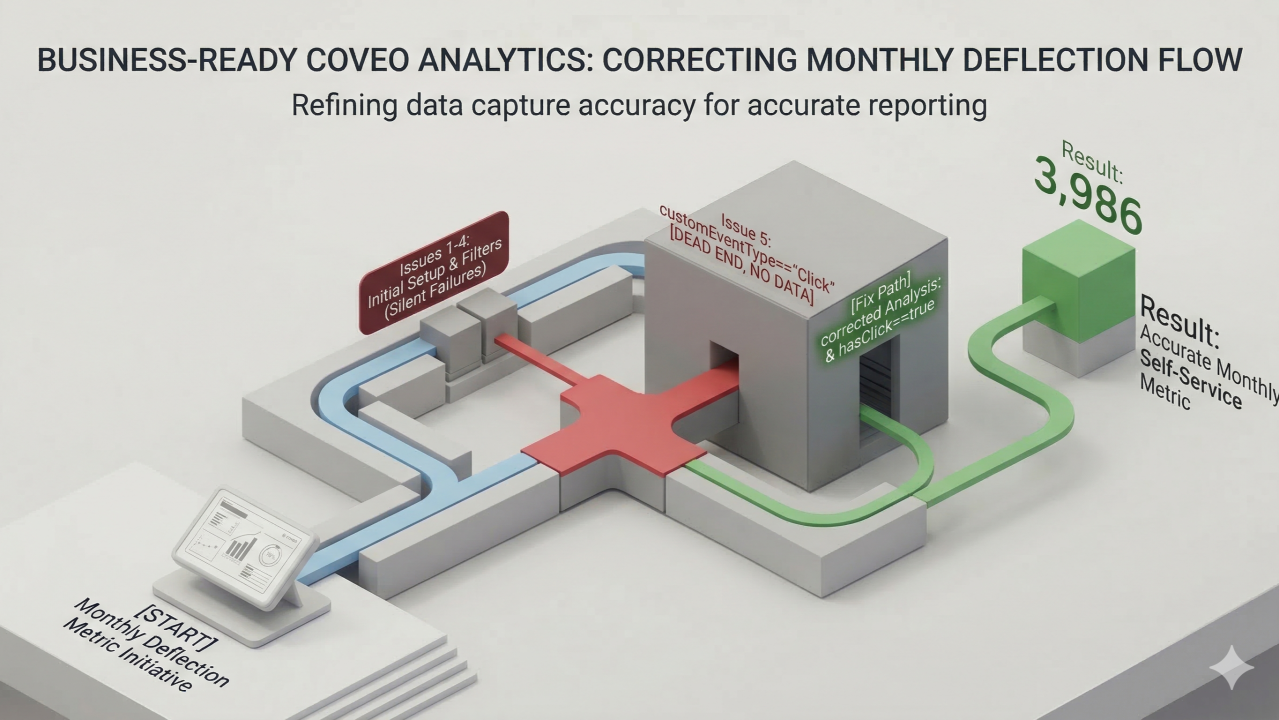
I spent a lot of time trying to figure out why the Coveo Usage Analytics API was not working right. It was giving me zeroes all the time. Then I found out that the dashboard and the API do not work well together. Here is what I learned from this.
We had to get some numbers from Coveo Usage Analytics every month. We needed to know how many people were using our self-service and how many cases were being deflected. We wanted to put these numbers into a Google Spreadsheet every month. This seemed like a task: just read the information, from the dashboard use it to make API calls and then write down the numbers.
Except it kept returning zero. For everything.
After a lot of digging, I found five separate issues. Each one was hiding behind the previous one.
Issue 1: totalCount is not the visit count
The combinedData response returns one row per dimension value. totalCount is the number of rows, not visits. With 3 search hubs, it returns 3. You need to sum UniqueVisit across all rows instead:
// ❌ WRONG — returns 3 (number of rows), not 6845
return data.totalCount;

// ✅ CORRECT — sum across all combination rows
return data.combinations.reduce(
  (sum, row) => sum + (row.UniqueVisit || 0), 0
);
Issue 2: Always include eventType explicitly
Without it, the API defaults to a single-event-type context and silently fails on multi-filter queries. All VisitMetric cards require eventType=join (or eventType=search for click metrics).
// Always include this — never omit it
["eventType", "join"]
Issue 3: $CASE_ASSIST_* flags cannot use comparison operators
Writing $CASE_ASSIST_CASE_SUBMIT==1 throws a 400 error. These are presence flags; they must be passed bare, with no operator:
// ❌ WRONG — 400 InvalidFilter error
f=$CASE_ASSIST_CASE_SUBMIT==1

// ✅ CORRECT — bare, no operator
f=$CASE_ASSIST_CASE_SUBMIT   // include
ef=$CASE_ASSIST_CASE_SUBMIT  // exclude
Issue 4: ef= silently breaks when combined with customEventType filters
Combine ef=$CASE_ASSIST_CASE_SUBMIT with a customEventType expression and you get HTTP 200 with an empty result. No error. Just nothing.
Issue 5, the big one: customEventType=='Click' has no data in the public API
The dashboard JSON shows this filter. It looks legitimate. But it returns zero in every form for community search hubs, different operators, different cases, with or without other filters. Zero.
The reason: community hubs log clicks as standard click events, not Coveo custom events. The dashboard uses customEventType=='Click' as a UI abstraction that its internal engine resolves differently. The public API evaluates it literally against a table that has no data for these hubs.
How did I figure it out? It was not magic or anything like that. I just kept trying and trying. I changed the settings a lot. Used console.log to see what the API was really saying. I also searched on Google. Talked to AI about my ideas. I did this over and over until I finally saw the patterns.
The fix: use eventType=search with hasClick==true instead. The hasClick field is a boolean stamped on every search event that records whether the session resulted in a click.
// ❌ WRONG — customEventType has no data for community hubs
eventType=join
f=(customEventType=='Click') AND (originlevel1 IN [...])
// result: 0

// ✅ CORRECT — hasClick==true on search events
eventType=search
f=(originlevel1 IN [...])
f=hasClick==true
ef=$CASE_ASSIST_CASE_SUBMIT
// result: visits > 0
One caveat: this approach returns ~5% fewer visits than the dashboard. The dashboard's internal engine counts across all event types simultaneously. The public API can't fully replicate that. For trend reporting, the gap is consistent and acceptable.
If you're building against the Coveo UA (Usage Analytics) Read API and hitting unexplained zeroes, check these things first. The documentation doesn't cover the gap between what the dashboard JSON shows and what the API actually accepts.