AI
How to Actually Write for AEO: A Technical Guide to Content That Gets Cited
Not another "add an FAQ section" checklist. This is about how it works
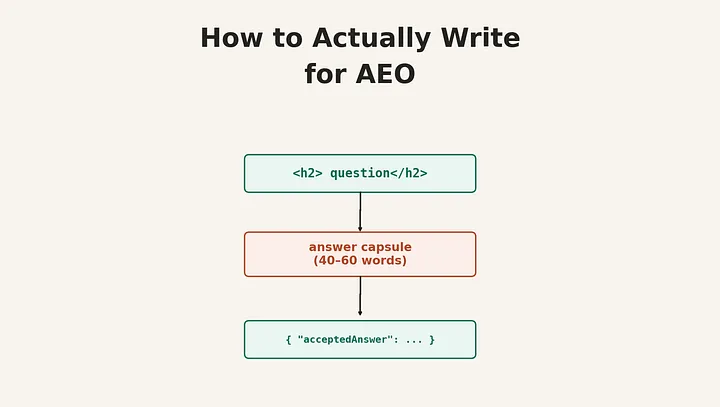
Not another "add an FAQ section" checklist. This is about how it works: why answer engines pick what they pick, and how to set up your content so yours is what gets chosen.
The first piece in this series said that AEO and SEO are different things that sometimes work against each other, and that the best fix is making two versions for each topic: a long page for human readers and search ranking, and short, stand-alone "answer capsules" written to be pulled by AI.
This piece is about that second version. Not as a fuzzy idea, but as a clear, specific content pattern, where it goes, how long it should be, what it should look like inside, and how it works with schema markup, heading order, and the way AI systems actually decide whether to use your content in a generated answer.
If you've read AEO advice that basically says "write clear, helpful content with good headings," this is the version that explains why that works, so you can use it with real understanding instead of just following steps.
Why structure matters more than writing quality
Most AI answer engines, whether that's Google's AI Overviews, Perplexity, or a chat tool built on retrieval-augmented generation, don't read your page the way a person does. They pull chunks. A chunking system breaks your page into pieces, usually a few hundred words each, often lined up with heading breaks. Those chunks get processed, stored, and pulled up separately based on how well they match the user's question. The AI then writes a response using whatever chunks it found, no matter where they were on your page or what came before them in your writing.
This has a downside: a chunk that depends on something said earlier in the article, "as discussed above," "building on the previous point," "this approach", might get pulled without that earlier context ever coming with it. If the chunk doesn't make sense on its own, the AI either can't use it or, worse, uses it and gets something slightly wrong because it's missing an important detail that was three paragraphs up.
This is also why the "answer-first" structure isn't just about style. If your section starts with two sentences setting the scene before getting to the actual answer, and the chunk break falls in the middle of your section, the AI system might grab the scene-setting part and miss the answer completely. Putting the answer first isn't about being short for the sake of it. It's about making sure the most likely part to be pulled and used is the part that actually answers something.
One more detail worth knowing: a February 2026 experiment found that ChatGPT and Perplexity pulled information from JSON-LD schema that wasn't even shown on the page, a schema describing content that didn't exist in the visible HTML. The most likely reason is that these systems read the whole HTML file, including script blocks, rather than reading structure and content separately. The key takeaway is this: your schema and your visible content are read as one single stream. If they say different things, you're not covering your bases, you're creating a conflict the AI has to sort out somehow, and you don't get to decide how.
The answer capsule: a specific pattern, not just a feeling
The single most consistently cited writing pattern in current AEO research is what's usually called the answer capsule: a stand-alone, 40-to-60-word direct answer placed right below a heading, before any supporting detail.
The length isn't random, and it's worth understanding both ends of the range. Under 40 words, a passage usually doesn't have enough context to be useful on its own; it reads like a fragment rather than a complete thought. Over 60 words, AI systems increasingly treat the passage as regular body text rather than a separate thing worth pulling, so it gets treated the same as everything else on the page. The 40-to-60 word window is where a passage is long enough to be a complete, stand-alone answer but short enough to be treated as its own unit rather than just blending into the surrounding paragraph.
A good capsule has three parts, in order. First, the direct answer itself, a definition, a number, a yes/no, with the immediate reason why. Second, a qualifier or extra detail that stops the answer from being misleadingly general, the condition under which it's true, or the situation it applies to. Third, optionally, a sentence of context, why this matters or how it connects to the bigger topic, but only if it fits in the word count; cut it before cutting the first two parts.
Here's the difference in practice. A vague opening:
"When it comes to choosing between a scratch org and a sandbox for Salesforce development, there are a number of factors that teams need to consider, and the right choice often depends on your specific use case and development workflow."
That's 38 words and answers nothing. Here's a capsule version of the same topic:
"Use scratch orgs for short-lived feature development with source-driven workflows, since they're created from a definition file and thrown away after use. Use sandboxes when you need lasting environments with existing data, such as full or partial copies of production for UAT or staging. Scratch orgs are faster to set up; sandboxes better reflect production state."
That's 54 words. It answers the implied question (which one, when) in the first sentence, adds the qualifying detail in the second, and gives a one-line tradeoff in the third. An AI system can lift that whole passage and it stands on its own. Notice also what's missing: no "it depends," no "there are several factors," no hedging. The hedging isn't wrong exactly; it's just that hedged language doesn't compress into something an AI can pull as a clear answer, so it gets skipped over for a competitor's page that committed to an answer.
One capsule per major heading is the right amount. Five to ten per long article is typical. More than one capsule per section makes it unclear which passage the AI should treat as the main answer for that section, so resist the urge to also write a capsule for the second-most-important point in a section — that point becomes part of the supporting detail instead.
Headings as the retrieval index
If capsules are the units that get pulled, headings are how the AI system decides which chunk is relevant to which question, so they need to be written as questions or clear topic statements that match how someone would actually ask, not as section labels for a person skimming a table of contents.
"Scratch orgs vs. sandboxes" is a fine heading for a human reader. "When should you use a scratch org instead of a sandbox?" is a better heading for both audiences, it's still easy to scan for a human, and it's almost a direct match for the kind of question a user would type into ChatGPT or Perplexity. The capsule beneath it then becomes the direct answer to that exact question.
This matters more than it sounds like it should, because of how query-to-chunk matching works. The AI system is measuring similarity between the user's question and your heading-plus-chunk text. A heading written as a question creates a much closer match to a question-style query, which is how most conversational AI queries are written, than a heading written as a noun phrase does. You're not gaming anything here; you're reducing the gap between what the reader asked and what your content says.
This also changes how you think about organizing a long technical page. Instead of organizing by topic area the way a reference manual would ("Configuration," "Authentication," "Error handling"), organize by the questions a practitioner actually has at each stage ("How do you configure SSO for a Salesforce sandbox?", "Why does my integration user get an INVALID_SESSION_ID error after a sandbox refresh?"). The content underneath can be the same. The headings are doing different work.
Schema markup: what actually matters and what to skip
Schema markup has a complicated recent history that's worth knowing before you put time into it. In August 2023, Google restricted FAQPage rich results, the visual accordion in search results, to a narrow set of trusted government and health sites. For most businesses, FAQPage schema stopped producing the visual snippet it was originally built for.
What it didn't stop doing is helping AI systems understand the structure of your page. A 2025 study of 50 sites found pages with FAQPage schema got roughly a 41% citation rate in AI-generated answers, versus 15% for pages without it, about 2.7 times higher. A separate study from SE Ranking found a smaller lift (4.9 average AI Mode citations with FAQ schema versus 4.4 without). Both studies measured different things and shouldn't be combined, but the general signal across independent studies is consistent: FAQ schema lost its visual search result feature for most sites, but kept, or gained, value as an AEO signal specifically.
For a B2B SaaS or enterprise content program, five schema types do almost all of the useful work, and the rest is mostly not worth the effort to set up:
Organization schema, with sameAs links to your verified profiles (LinkedIn, Crunchbase, Wikipedia if applicable) and knowsAbout declarations describing your areas of expertise, is an entity identification signal. It tells answer engines which "Acme Corp" you are, among however many companies share a name, and what topics you're a credible source on.
Article or BlogPosting schema, linked via author to a Person entity and publisher to your Organization entity, sets up the authorship and ownership chain that underlies E-E-A-T evaluation. This is the schema equivalent of a byline and publication name, except machine-readable.
FAQPage schema, on pages where you have real, visible Q&A content, with the full question and answer text matching what's shown on the page exactly. The "exactly" matters: since LLMs read schema and visible content as one stream, a mismatch between what your FAQPage schema says the answer is and what the page actually shows is a conflict signal, not a backup.
HowTo schema, for genuinely step-by-step content, numbered steps with a clear start and end state. This lines up with how technical documentation is often already written, so for a docs team this is usually close to free.
BreadcrumbList schema, which seems like the least exciting of the five, but it's a cheap signal of where a piece of content sits in your topic structure, which feeds into how answer engines judge topic authority across a group of related pages rather than a single page.
What to skip, at least initially: Product/Offer schema unless you're running e-commerce, LocalBusiness unless location matters to your business, and Speakable schema, which targets voice assistants specifically and is still a small slice of the total query volume for most B2B contexts. Schema.org has dozens of types; the main rule is that schema should describe what's already visible on the page, and how completely you fill out a handful of types (does your Organization schema actually have sameAs and knowsAbout filled in, not just @type: Organization and a name) matters more than having lots of different types.
Implementation detail for anyone building this at scale: group related schema into a single JSON-LD block using the @graph array (an Article entity, linked to a Person and an Organization, with a nested FAQPage, all in one script tag) rather than spreading multiple separate blocks around. Site-wide schema, Organization, and Website belong in your global template; page-specific schema belongs in the page template, not added per-page through a CMS plugin, which tends to produce inconsistent or broken output at scale. Check with the Schema.org Validator for spec compliance and Google's Rich Results Test for Google's stricter rules, and re-check periodically. Google removed seven schema types in June 2025; whatever you set up today is not guaranteed to still be right in eighteen months.
Putting it together: what the actual markup looks like
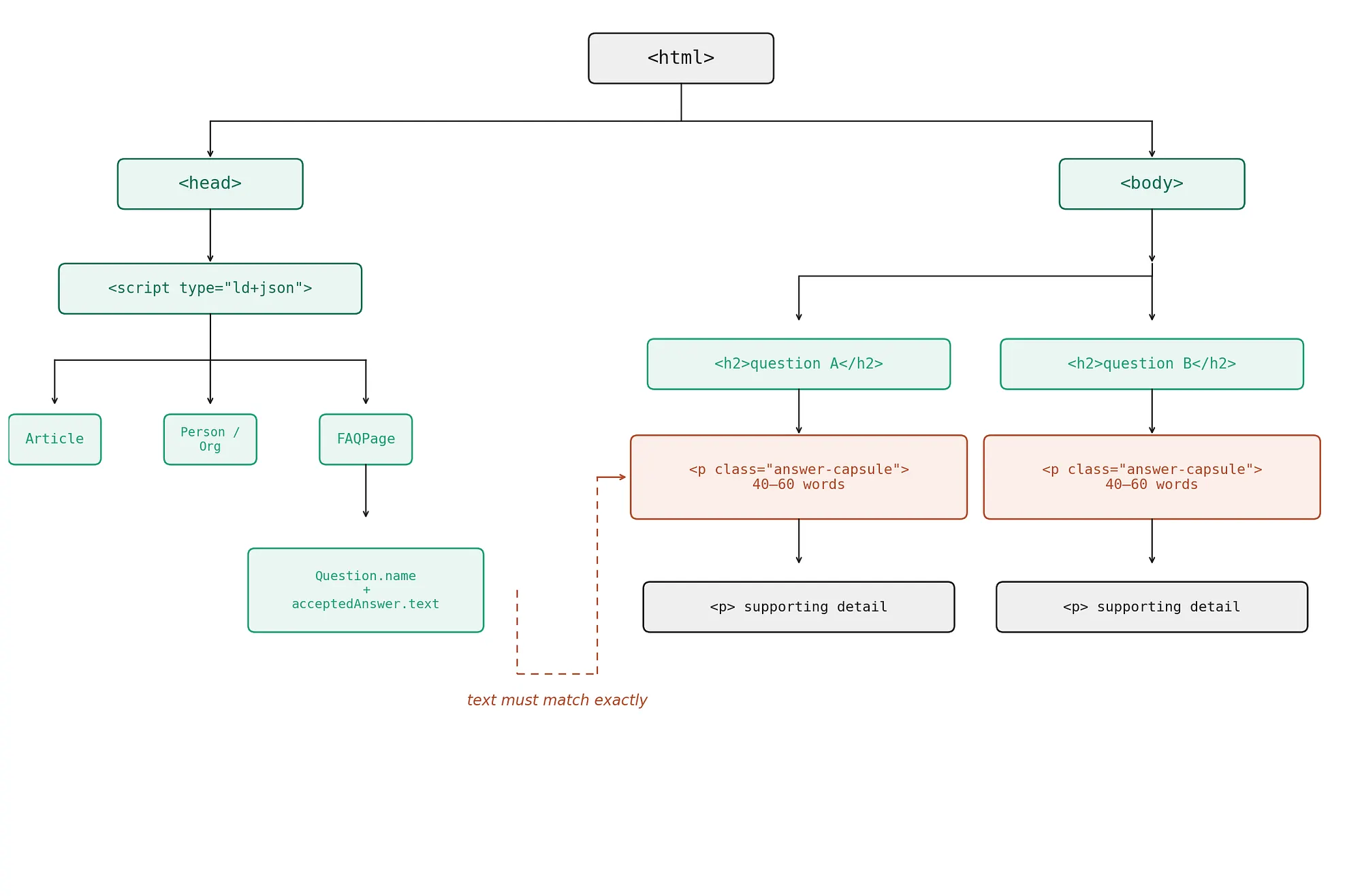
Everything above describes pieces on their own. The diagram below shows how they fit together into a page structure: the head carries a single JSON-LD block describing the page as an entity graph (Article linked to Person and Organization, plus a FAQPage with one Question per answerable section), while the body repeats a simple pattern for each major section, a question-form heading, an answer capsule right beneath it, then supporting detail. The dashed line is the relationship that matters most in practice: the FAQPage's acceptedAnswer.text and the visible capsule paragraph have to be the exact same text, not two versions maintained separately.
 )
)
Here's the same structure as actual markup, using the scratch-org-versus-sandbox example from earlier. This is a deliberately small example, one H2 with one capsule, plus the schema that ties it together, but the pattern repeats for every major section on the page.
<head>
    <script type="application/ld+json">
        {
            "@context": "https://schema.org",
            "@graph": [
                {
                    "@type": "Article",
                    "@id": "https://docs.example.com/sfdx/scratch-orgs-vs-sandboxes#article",
                    "headline": "Scratch orgs vs. sandboxes: when to use each",
                    "author": {
                        "@id": "https://example.com/team/jane-doe#person"
                    },
                    "publisher": {
                        "@id": "https://example.com#organization"
                    },
                    "datePublished": "2026-01-14",
                    "dateModified": "2026-06-10",
                    "mainEntityOfPage": "https://docs.example.com/sfdx/scratch-orgs-vs-sandboxes"
                },
                {
                    "@type": "Person",
                    "@id": "https://example.com/team/jane-doe#person",
                    "name": "Jane Doe",
                    "jobTitle": "Senior Salesforce Developer",
                    "sameAs": ["https://www.linkedin.com/in/janedoe"]
                },
                {
                    "@type": "Organization",
                    "@id": "https://example.com#organization",
                    "name": "Example Corp",
                    "url": "https://example.com",
                    "sameAs": ["https://www.linkedin.com/company/example-corp"],
                    "knowsAbout": ["Salesforce development", "SFDX", "CI/CD for Salesforce"]
                },
                {
                    "@type": "FAQPage",
                    "mainEntity": [
                        {
                            "@type": "Question",
                            "name": "When should you use a scratch org instead of a sandbox?",
                            "acceptedAnswer": {
                                "@type": "Answer",
                                "text": "Use scratch orgs for short-lived feature development with source-driven workflows, since they're created from a definition file and thrown away after use. Use sandboxes when you need lasting environments with existing data, such as full or partial copies of production for UAT or staging. Scratch orgs are faster to set up; sandboxes better reflect production state."
                            }
                        }
                    ]
                }
            ]
        }
    </script>
</head>
<body>
    <article>
        <h1>Scratch orgs vs. sandboxes: a practical comparison</h1>
        <section>
            <h2>When should you use a scratch org instead of a sandbox?</h2>
            <p class="answer-capsule">
                Use scratch orgs for short-lived feature development with source-driven
                workflows, since they're created from a definition file and thrown away after
                use. Use sandboxes when you need lasting environments with existing data, such
                as full or partial copies of production for UAT or staging. Scratch orgs are
                faster to set up; sandboxes better reflect production state.
            </p>
            <p>
                That's the short version. The longer version depends on which sandbox type
                you're comparing against and how your org handles data seeding…
            </p>
        </section>
    </article>
</body>
A few things to notice about how these pieces connect, none of which are obvious if you look at any one piece on its own.
The H2 and the FAQPage Question.name are the same strings. This isn't repetitive; it's the link between the visible heading structure and the structured data, and it's what lets a retrieval system confirm that the schema is describing the section it's attached to rather than something else on the page.
The capsule paragraph and the FAQPage acceptedAnswer.text are also the same, word for word. Remember the tokenization finding from earlier: if these two differ, even slightly, you're not giving two versions for two different audiences, you're creating a conflict in the same token stream. Whatever CMS or templating approach you use, this should be enforced automatically. Ideally, the schema is generated from the same source field as the visible capsule, not kept as a separate copy that someone has to remember to update in two places.
The @id references connecting Person, Organization, and Article aren't just decoration. They're what allow an answer engine to identify "who is Jane Doe" and "what is Example Corp" as real entities with a history, knowsAbout, and sameAs filled in, rather than as strings that happen to appear near each other on a page. This is the completeness point from earlier: an Organization schema block with just @type and name does little; the same block with sameAs linking to a real LinkedIn company page and knowsAbout filled in with your actual areas of expertise is what builds the entity graph.
The <p class="answer-capsule"> element is just a regular paragraph with a class name on purpose. There's no special HTML element for "answer capsule"; it's a content pattern, not a markup feature. The class is there so your team can check a page (or run automated checks) for whether every H2 is followed by something tagged as a capsule, and so design can apply simple, distinct styling, slightly different background, and a small label, if that helps readers too. But the thing that matters to the answer engine is the content and its position right after the heading, not the class name itself.
One thing this example doesn't show on purpose: a long page with ten H2 sections would repeat the h2/capsule/supporting-detail pattern ten times, but would only need one JSON-LD block in the head, with the FAQPage mainEntity array containing one Question entry per section that has a real question-and-answer structure. Not every H2 needs a matching FAQ entry, only those that are written as questions with a direct answer. A heading like "Prerequisites" wouldn't get one; "What permissions does a scratch org need before you can push source to it?" would.
Information gain: the part that can't be templated
Everything above is about structure, and structure is needed, but not enough. Answer engines, like search engines before them, are increasingly looking at whether a piece of content adds anything that wasn't already said somewhere else. The HubSpot framing for this is "information gain": original data, a specific setup detail from real-world use, a number nobody else has published, an opinion based on direct experience.
This is where the enterprise content advantage actually is, and where most AEO advice runs out of useful things to say, because it's not a formatting question. A generic explanation of "how SSO works with Salesforce" has been written hundreds of times, and answer engines have hundreds of nearly identical sources to choose from for that question. A specific write-up of the exact error code sequence your team hit when moving from a SAML-based SSO setup to an OIDC-based one during a sandbox refresh, including the actual error string, is something that may have been written once or never. That level of detail is both more useful to the small audience who hits that exact problem, and more likely to be the source an answer engine cites, precisely because it isn't a repeat of everything else in the index.
In practice, this means the highest-value AEO content for a technical organization often isn't the polished explanation aimed at a broad audience. It's the internal runbook, the post-incident write-up, the "here's what actually happened when we did X" piece, restructured with capsules and proper headings, but with the specific details kept in rather than removed. The urge to remove the specific details to make content "more broadly useful" is often exactly backwards from an AEO point of view: the specific details are the information gain.
A retrofitting workflow, not just a new-content checklist
Most of what's published about AEO assumes you're writing new content. For an established content base, knowing how to update old content matters more, both because there's more of it and because existing pages already carry authority signals (backlinks, age, indexing history) that new pages don't have yet. Citation improvement on updated high-authority pages tends to show up faster, often within four to eight weeks, than on new content, which has to build authority from zero, no matter how well-structured it is.
The update process that maps to everything above: start with pages that already get meaningful organic traffic, since they have the underlying authority. For each major H2, check whether the first 40-to-60 words after the heading would stand on their own as a complete answer if pulled with nothing else. If not, rewrite that opening as a capsule, moving existing content down to become the supporting detail rather than removing it. Rewrite headings that are topic labels into question form where a natural question exists. Add or fix schema, particularly Article/Person/Organization linking and FAQPage where real Q&A content exists, checking that the schema text matches the visible text exactly. Then, and this is the step that's easy to skip because it doesn't feel like an AEO task, look at what in the piece is generic versus what's specific to your situation, and consider whether the generic parts could be cut or shortened in favor of expanding the specific parts.
None of this needs new content production. It's editing, and for a technical content team, it's editing work that also overlaps with making documentation better for human readers, too. A capsule that stands alone is also just a better-written opening paragraph. The AEO framing gives you a reason to prioritize this kind of editing pass, but the quality improvement isn't AEO-specific.
This article, updated: a worked example
Rather than describe the update process in the abstract, here's the workflow applied to a section of this article itself, using the heading-and-capsule example from earlier as the starting material.
The "Headings as the retrieval index" section above opens like this in its original, human-readable form:
ORIGINAL HEADING + OPENING:
Headings as the retrieval index: If capsules are the units that get retrieved, headings are how the retrieval system decides which chunk is relevant to which query, so they need to be written as questions or direct topic statements that mirror how someone would actually ask, not as section labels for a human skimming a table of contents.
That's a reasonable opening for a reader working through the article in order. It's also exactly the pattern the update workflow flags: a topic-label heading, followed by a sentence that explains a concept before stating any single clear claim. Applying the update steps from the previous section, heading first, then capsule:
UPDATED HEADING
"Should AEO headings be questions or topic labels?"
UPDATED CAPSULE (52 WORDS, PLACED IMMEDIATELY AFTER THAT HEADING)
ANSWER CAPSULE AEO headings should be written as questions when a natural question exists, because retrieval systems match query text against heading-plus-chunk text, and a question-form heading is a closer match to a question-form query. "Scratch orgs vs. sandboxes" works for human skimmers; "When should you use a scratch org instead of a sandbox?" works for both human skimmers and AI retrieval.
Everything that follows in the original section, the explanation of why this matters, the query-to-chunk matching mechanism, and the information-architecture implication, becomes supporting detail under that capsule rather than the opening.
This update also generates a real FAQPage entry, using the updated heading as Question.name and the capsule as acceptedAnswer.text, word for word:
{
    "@type": "Question",
    "name": "Should AEO headings be questions or topic labels?",
    "acceptedAnswer": {
        "@type": "Answer",
        "text": "AEO headings should be phrased as questions when a natural question exists, because retrieval systems match query text against heading-plus-chunk text, and a question-form heading is a closer match to a question-form query. \"Scratch orgs vs. sandboxes\" works for human skimmers; \"When should you use a scratch org instead of a sandbox?\" works for both human skimmers and AI retrieval."
    }
}
Two things worth noting about this example specifically. First, the capsule didn't need new content; it's a compression of claims already present in the original paragraphs, restated answer-first. That's the core promise of the update workflow: this is editing, not new writing. Second, and this is worth sitting with, this very article was not fully updated this way. The headings above are mostly topic labels ("Why structure matters more than writing quality," "Schema markup: what actually matters") and the sections don't open with 40-to-60-word capsules. That's a deliberate choice, not an oversight. An article where every section opened with a clipped, no-hedging capsule would be exhausting to read straight through, and this piece is written mainly for the long-form, human-reading version described in the first article of this series. The worked example above is what the other version, the capsule version, would look like for this one section. Producing both, for every section, is the two-artifacts workflow in practice, and doing it for an entire article by hand, as this single example shows, is real editing work, not a find-and-replace.
What this doesn't solve
Worth being direct about the limits here, in the spirit of the first article's source caveats. Structure and schema affect whether your content can be cited, given that an answer engine has already pulled it as a candidate. They do very little for whether your content gets pulled as a candidate in the first place, which depends much more on domain authority, topic relevance, and the external citation graph discussed in the previous article. A perfectly structured page on a domain with no external presence is still unlikely to show up. Structure is a multiplier on a starting point that other work has to establish.
It's also worth noting that everything in this article describes the current state of systems that are changing fast. The 40-to-60 word range, the specific schema types, the chunking behavior, all of this reflects how today's retrieval-augmented generation systems happen to work. None of it is guaranteed to be the right pattern in two years, and some of it may already be slightly out of date by the time you're reading this. The underlying principle, write content that's true, specific, and makes sense as a stand-alone unit, is more lasting than any of the specific numbers attached to it. If the 40–60 word rule changes to a 30–50 word rule next year, content built around "answer the question directly, then add one qualifier" will need a trim, not a full rewrite. Content built around "vague scene-setting followed by eventually getting to the point" will need a full rewrite either way.